
Showing posts with label Families. Show all posts
Showing posts with label Families. Show all posts
Wednesday, November 18, 2009
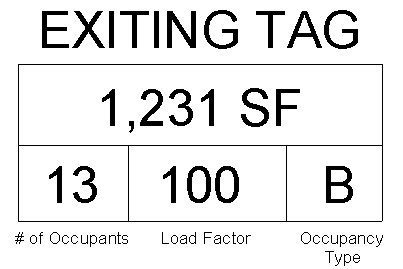
Exiting Tags

Thursday, November 12, 2009
Customizing Viewports
Creating custom viewports on sheets is no longer as simple as drawing a line with text. It's far more intelligent than that now. In our quest to mimic our old viewport settings used in CAD, we came across this family. Like everything in revit, parameters need be set, families loaded, and settings set accurately. Viewports are no different. In this post, I'll go over the process of setting up custom viewports that meet your needs.

DOWNLOAD Four custom viewports with different title settingsAfter downloading the family, load it onto your project. Once the family has been loaded onto the project and you have placed a detail onto a sheet, you'll have to create a duplicate viewport so that the new settings don't overwrite the existing. I'm sure we've all learned the hard way that if you change the settings on an object, it changes all that have the same instance. Therefore, duplicate the viewport. Right click, go to element properties, duplicate. Name the new viewport accordingly.

Once the new viewport has been created, under the "Title" parameter, the new loaded viewport family should appear. Select it and hit OK until all the type properties windows are closed. And you're done. Repeat this until you've created all the viewports you need.

DOWNLOAD
Another Light
People seem to really be enjoying the last light we posted, so here is another one... this one took some effort to get the double glass surround just right, but we got there and it looks great.

Manufacture: Louis Poulsen
Model: Campbell
Light Source: 1/75w modeled with photometric data
DOWNLOAD
DOWNLOAD FILE AT REVIT CITY
Manufacture: Louis Poulsen
Model: Campbell
Light Source: 1/75w modeled with photometric data
DOWNLOAD
DOWNLOAD FILE AT REVIT CITY
Wednesday, November 11, 2009
You Can't Always Find the Perfect Family
Some manufactures are getting on the Revit band wagon, but it seems next to impossible to find the exact lighting fixture, chair (or anything really) already modeled. More often than not we find ourselves starting form scratch to get it just right.

DOWNLOAD FILE AT REVIT CITY
We will share with you family RFA's we make, boring to complex and everything in between.
Here is a light fixture we modeled:
Manufacture: Louis Poulsen
Model: Ph50
Light Source: 200w modeled with photometric data
Model: Ph50
Light Source: 200w modeled with photometric data
DOWNLOAD FILE AT REVIT CITY
Subscribe to:
Posts (Atom)
